Purchase Orders
The Purchase Orders module allows businesses to create, manage, and track supplier orders inside Print Shop Worx.
Purchase Orders help businesses manage incoming stock, supplier purchasing, production materials, and inventory replenishment.
Start Here
This module is essential for businesses ordering:
- Blank garments
- Promotional products
- Consumables
- Packaging materials
- Printing supplies
- Embroidery supplies
- Transfer materials
The Purchase Orders module is commonly used by:
- Administration staff
- Purchasing managers
- Inventory managers
- Production managers
- Business owners
Main Functions
The Purchase Orders module allows users to:
- Create purchase orders
- Order supplier products
- Track supplier deliveries
- Manage incoming inventory
- Record supplier invoices
- Monitor order status
- Receive stock into inventory
- Track backorders
- Manage supplier information
- Control purchasing workflows
What Is A Purchase Order?
Purpose
A Purchase Order (PO) is a document sent to a supplier requesting products or materials.
A Purchase Order typically includes:
- Products being ordered
- Quantities
- Pricing
- Supplier details
- Delivery instructions
- Purchase order number
Purchase Orders help businesses maintain accurate purchasing records and inventory control.
Why Purchase Orders Are Important
Purchase Orders help businesses:
- Track supplier purchases
- Control spending
- Manage stock levels
- Prevent ordering mistakes
- Improve inventory accuracy
- Track supplier deliveries
- Maintain purchasing records
Purchase Orders Dashboard
Purpose
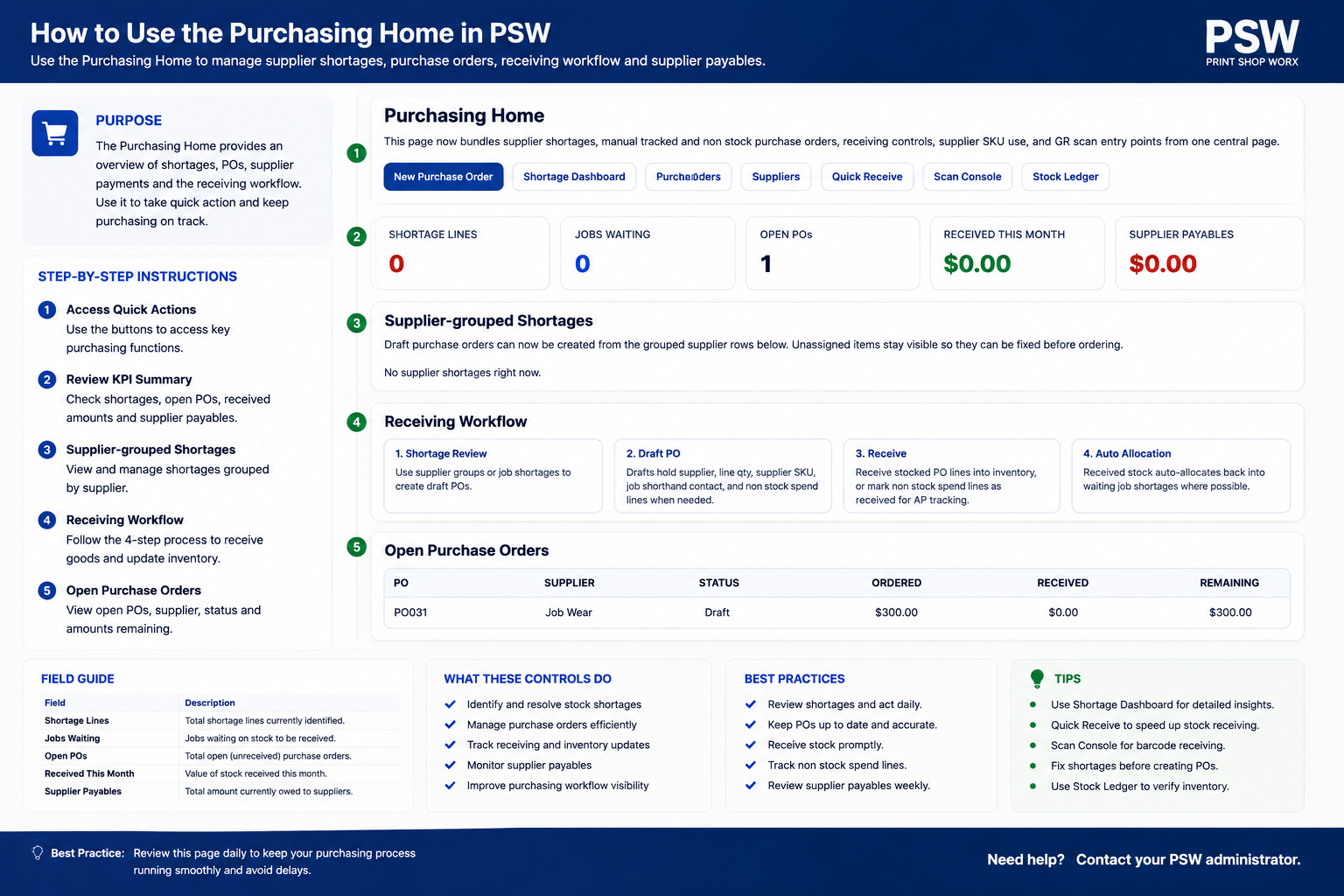
The Purchase Orders dashboard provides visibility into all supplier orders and purchasing activity.
Users can quickly:
- View open purchase orders
- Monitor deliveries
- Track backorders
- Review supplier status
- Check received stock
- Search purchase orders
Standard Purchase Order Workflow
Purchase Order Process
- Identify products requiring purchase
- Create purchase order
- Select supplier
- Add products and quantities
- Confirm pricing
- Send purchase order to supplier
- Supplier processes order
- Goods received into inventory
- Purchase order marked completed
Purchase Order Fields
Purchase Order Number
Stores the unique PO reference number.
Used for:
- Supplier communication
- Inventory tracking
- Financial records
- Reporting
Purchase order numbers are usually generated automatically.
Supplier Selection
Purpose
The supplier field links the purchase order to a supplier account.
Supplier records may contain:
- Supplier name
- Contact details
- Supplier pricing
- Payment terms
- Delivery details
Order Date
Displays the date the purchase order was created.
Used for:
- Tracking
- Reporting
- Supplier management
Expected Delivery Date
Displays the estimated supplier delivery date.
This helps businesses:
- Schedule production
- Plan inventory
- Manage customer deadlines
Products Ordered
Displays all products included on the purchase order.
Examples include:
- Blank garments
- Caps
- Packaging supplies
- Promotional items
- Ink supplies
- Embroidery backing
- DTF film
Quantity
Displays the quantity ordered from the supplier.
Cost Price
Displays the supplier purchase price.
Cost pricing is used for:
- Inventory valuation
- Profit calculations
- Purchasing analysis
Supplier Notes
Stores purchasing instructions or supplier communication notes.
Examples include:
- Urgent delivery request
- Split shipment instructions
- Packaging requirements
- Production deadlines
Purchase Order Statuses
Draft
Purchase order created but not yet sent to supplier.
Sent
Purchase order has been issued to the supplier.
Partially Received
Some ordered products have been received but the order is incomplete.
Completed
All products have been received and processed into inventory.
Cancelled
Purchase order has been cancelled and closed.
Sending Purchase Orders
Purpose
Purchase Orders can be emailed directly to suppliers using the configured email system.
Benefits include:
- Faster ordering
- Professional documentation
- Reduced manual administration
- Improved supplier communication
Supplier Email Integration
Purpose
Suppliers may receive:
- Purchase order PDFs
- Order summaries
- Delivery instructions
- Product lists
directly through email integration.
Inventory Integration
Purpose
Purchase Orders integrate directly with inventory management.
Receiving stock may automatically:
- Increase stock levels
- Update inventory quantities
- Track incoming products
- Record stock history
Receiving Inventory
Purpose
The receiving process confirms products have arrived from suppliers.
Receiving inventory helps:
- Verify quantities
- Update stock levels
- Identify shortages
- Confirm deliveries
Partial Deliveries
Purpose
Suppliers may deliver orders in multiple shipments.
Partial receiving allows businesses to:
- Receive available stock
- Track remaining items
- Manage backorders
Backorders
Purpose
Backorders track products still outstanding from suppliers.
This helps businesses:
- Monitor delayed stock
- Communicate delivery expectations
- Manage production scheduling
Supplier Management
Purpose
Supplier records help businesses organize supplier information.
Supplier records may include:
- Contact information
- Supplier pricing
- Payment terms
- Preferred suppliers
- Supplier notes
Purchase Order PDF Generation
Purpose
Purchase Orders can be generated as professional PDF documents.
PDFs may include:
- Company branding
- Supplier details
- Ordered products
- Pricing
- Delivery instructions
Purchasing Reports
Purpose
Purchase reporting helps businesses monitor:
- Supplier spending
- Product purchasing
- Inventory costs
- Supplier performance
- Purchasing trends
Production Purchasing
Purpose
Production teams may create Purchase Orders for:
- Urgent garments
- Special materials
- Customer-specific products
- Outsourced production
Best Practices
Verify Supplier Pricing
Always confirm supplier pricing before sending purchase orders.
This helps protect:
- Profit margins
- Cost accuracy
- Financial reporting
Track Deliveries Carefully
Always verify received quantities against supplier deliveries.
This reduces:
- Inventory errors
- Stock shortages
- Supplier disputes
Use Preferred Suppliers
Using approved suppliers improves:
- Pricing consistency
- Product quality
- Delivery reliability
Keep Supplier Records Updated
Maintain current supplier:
- Contact information
- Pricing
- Payment terms
- Delivery details
Common Use Cases
Garment Ordering
Order blank garments for production jobs.
Promotional Product Purchasing
Purchase supplier promotional items for customer orders.
Consumable Replenishment
Reorder:
- Ink
- Transfer film
- Embroidery backing
- Packaging materials
Rush Production Orders
Quickly source urgent materials required for customer deadlines.
Troubleshooting
Purchase Order Not Sending
Check:
- Supplier email address
- SMTP settings
- Internet connection
- PDF generation settings
Inventory Not Updating
Check:
- Receiving status
- Product linkage
- Inventory synchronization
Incorrect Supplier Pricing
Check:
- Supplier pricing records
- Product cost setup
- Currency settings
Missing Purchase Order
Check:
- Purchase order status
- User permissions
- Search filters
Related Features
The Purchase Orders module works closely with:
- Inventory
- Products
- Suppliers
- Production Queue
- Reporting
- Invoices
- Cost Tracking
- Dispatch
Summary
The Purchase Orders module is a critical purchasing and inventory management feature within Print Shop Worx.
Proper purchase order management improves:
- Inventory control
- Supplier communication
- Purchasing accuracy
- Cost management
- Production scheduling
- Workflow efficiency
A structured purchasing system helps businesses maintain accurate inventory levels while supporting efficient production operations and supplier management.
Getting Started
First login, workspace setup, users, permissions, and the basics of using Print Shop Worx.
Sales & Customers
Manage customers, quotes, invoices, sales workflow, pricing groups, and customer approvals.
Production & Stock
Track production jobs, stock allocation, purchase orders, suppliers, scan workflows, and job readiness.
Featured Support Articles
These are the key support articles most users should read first. Duplicate this section in Elementor if you want to add more featured articles later.
First Login & Password Setup
Learn how to sign in for the first time, set your password, and confirm your workspace access.
Customers
Create and manage customers, contact details, delivery addresses, pricing groups, and account notes.
Quotes
Create quotes, add products and services, check pricing, send to customers, and convert approved work.
Invoices
Create invoices, send them to customers, record payment, and release paid work into production.
Browse by Workflow
Use workflow groups to keep support easy to navigate. This layout is fully editable in Elementor, so you can rename sections, change links, and replace images as the app grows.
- Sales: Customers, Quotes, Invoices, Sales Workspace, CRM.
- Production: Production Queue, Production Workflow, Scan Console.
- Inventory: Product Setup, Stock Allocation, Purchase Orders, Suppliers.
- Admin: Workspace Setup, Users, Permissions, Reports.
- Marketing: Campaigns and Social Scheduler.

Workflow image placeholder
Replace this with a screenshot or graphic showing the main Print Shop Worx workflow areas.
Recommended setup
Create your support pages as normal WordPress pages, then edit each one directly in Elementor using the same article layout.
URL structure
Use clean links such as /support/customers/, /support/quotes/, /support/invoices/, and /support/production-workflow/.
Maintenance tip
When you add a new feature to Print Shop Worx, duplicate an existing support article page and update the text, images, and buttons.
All Support Article Links
Use this list as your built-in link map. Update or remove links if your page slugs are different.
- Welcome to Print Shop Worx
- First Login & Password Setup
- Customers
- Customer Portal
- Quotes
- Invoices
- Sales Workflow & CRM
- Sales Workspace
- Pricing Groups & Customer Pricing
- Product Setup
- Services
- Production Workflow
- Production Queue
- Stock Allocation & Ordering
- Purchase Orders
- Suppliers
- Scan Console
- Reports
- Marketing Campaigns
- Social Scheduler
- Workspace Setup
- Users & Permissions
Popular Sections
Sales Workflow
Start here for customers, quotes, invoices, pricing groups, and customer approvals.
Production Workflow
Use this section for production readiness, job cards, blockers, stock, and job progress.
Workspace Setup
Use this section for business profile, users, permissions, GST, email, and pricing setup.
Need help with Print Shop Worx?
Book a demo or contact support if you need help setting up your support pages or using Print Shop Worx.