Overview
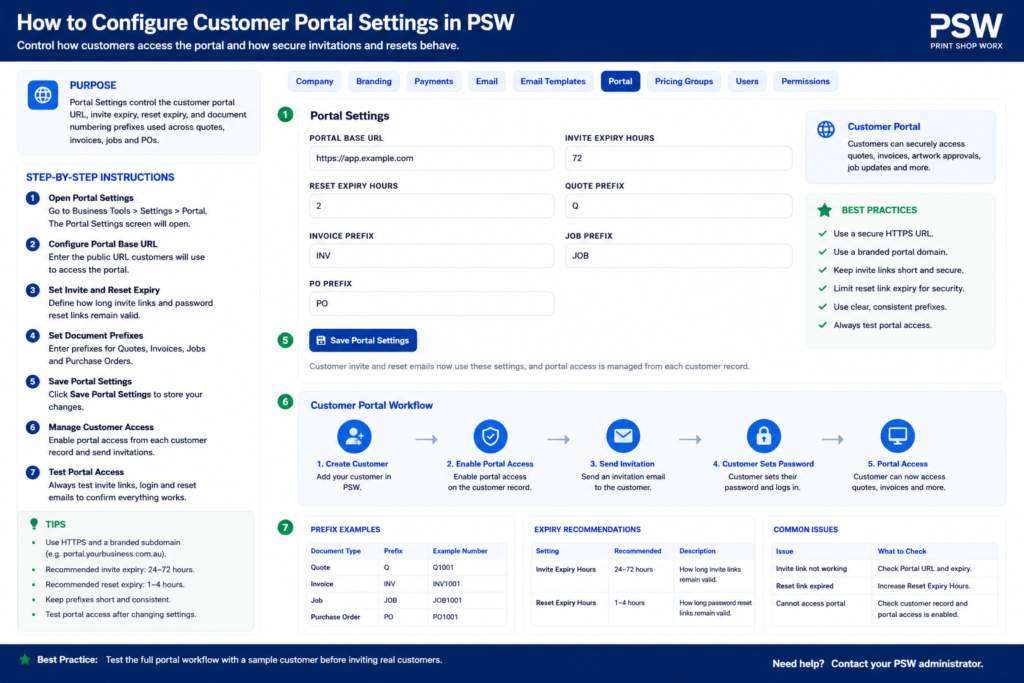
The Customer Portal Settings section controls how customers interact with the Print Shop Worx portal.
This includes customer login access, quote visibility, invoice visibility, artwork approvals, order tracking, portal branding, and customer communication settings.
Customer Portal Settings
Configure customer portal access, portal branding, customer visibility, approvals, invoice access, and customer-facing workflow settings inside Print Shop Worx.
This support article explains how to configure and maintain Customer Portal Settings so customers can securely access the information and actions intended for them.
Step-by-Step Instructions
Customer Portal Documentation
Overview
The Customer Portal allows customers to securely access their account information, quotes, invoices, artwork approvals, order tracking, and branding assets through an online self-service portal.
The portal is designed to improve communication, streamline approvals, reduce manual administration, and provide customers with real-time access to their production information.
The Customer Portal is commonly used by:
- Customers
- Account managers
- Sales teams
- Customer service staff
- Production coordinators
Main Functions
The Customer Portal allows customers to:
- View quotes
- Approve quotes
- View invoices
- Make payments
- Upload artwork
- Approve artwork proofs
- Track order progress
- Download files
- View branding assets
- Access order history
- Update account information
- Communicate with staff
Customer Portal Dashboard
Purpose
The Customer Portal dashboard provides customers with a centralized overview of their account activity.
Customers can quickly view:
- Open quotes
- Outstanding invoices
- Current production jobs
- Artwork approvals
- Recent orders
- Notifications
- Uploaded files
Customer Login System
Purpose
The login system provides secure access to customer information and production records.
Customers may access the portal using:
- Email address
- Password
- Secure login invitation
- Password reset functionality
Customer Portal Access
Portal Invitations
Portal invitations can be sent directly to customers via email.
This allows customers to securely:
- Create an account
- Access their records
- View production information
- Manage approvals
Quotes Section
Purpose
The Quotes section allows customers to review and manage quotations.
Customers can:
- View quote details
- Approve quotes
- Reject quotes
- Request quote changes
- Download quote PDFs
Quote Approval Workflow
Standard Quote Approval Process
- Quote is created by staff
- Quote is sent to customer
- Customer logs into portal
- Customer reviews quote
- Customer approves or requests changes
- Approved quotes move into production workflow
Invoices Section
Purpose
The Invoices section allows customers to access billing information.
Customers can:
- View invoices
- Download invoices
- View payment status
- Make online payments
- Review payment history
Payment Processing
Purpose
Online payment processing allows customers to securely pay invoices through the portal.
Possible payment methods may include:
- Credit card
- Debit card
- Bank transfer
- PayPal
- Stripe
- Square
Artwork Approval Section
Purpose
The Artwork Approval section allows customers to review and approve production artwork before manufacturing begins.
Customers can:
- View proofs
- Approve artwork
- Reject artwork
- Request revisions
- Leave approval comments
Artwork Approval Workflow
Standard Artwork Approval Process
- Staff uploads artwork proof
- Customer receives notification
- Customer reviews artwork
- Customer approves or requests changes
- Approved artwork releases job to production
Order Tracking
Purpose
The Order Tracking section provides customers with real-time production updates.
Possible order statuses may include:
- Quote Pending
- Awaiting Approval
- Awaiting Payment
- In Production
- Embroidery Running
- Printing
- Quality Check
- Ready for Collection
- Shipped
- Completed
Branding Assets Section
Purpose
The Branding Assets section allows customers to access their approved branding files and artwork records.
Customers may:
- Download approved logos
- Access embroidery files
- View approved artwork
- Access mockups
- Upload new branding files
File Upload System
Purpose
Customers can securely upload files directly through the portal.
Supported uploads may include:
- Logos
- Artwork files
- PDFs
- Mockups
- Production notes
- Customer supplied graphics
Notifications System
Purpose
The notifications system keeps customers informed throughout the production process.
Notifications may include:
- Quote ready
- Invoice issued
- Payment received
- Artwork approval required
- Production updates
- Order completed
- Shipment tracking
Account Management
Purpose
Customers can manage their account details through the portal.
Customers may update:
- Contact information
- Passwords
- Delivery addresses
- Billing information
- Notification preferences
Communication Features
Purpose
The portal may include messaging or communication tools between customers and staff.
Possible communication features include:
- Job comments
- Artwork feedback
- Production notes
- Approval comments
- Support requests
Security Features
Purpose
The Customer Portal uses secure authentication and permissions to protect customer data.
Security features may include:
- Password protection
- Secure login sessions
- User permissions
- Encrypted connections
- File access controls
Best Practices
Keep Customer Information Updated
Ensure customer contact details remain accurate to improve:
- Notifications
- Approvals
- Billing communication
- Delivery coordination
Require Artwork Approval Before Production
Always obtain customer artwork approval before starting production.
This helps reduce:
- Reprints
- Production errors
- Customer disputes
Encourage Portal Usage
Encouraging customers to use the portal improves:
- Communication speed
- Approval turnaround
- File management
- Customer experience
Common Use Cases
Quote Approval
Customers can quickly review and approve quotes online without requiring phone calls or email chains.
Artwork Proofing
Customers can review production proofs and approve artwork before manufacturing begins.
Order Tracking
Customers can track production progress without needing to contact staff directly.
Repeat Orders
Customers can review previous orders and reuse approved artwork for faster repeat ordering.
Troubleshooting
Unable to Login
Check:
- Correct email address
- Password accuracy
- Internet connection
- Portal invitation status
Missing Orders
Check:
- Customer account assignment
- Portal permissions
- Order visibility settings
Artwork Not Displaying
Check:
- File upload status
- Supported file formats
- Browser compatibility
- Internet connection
Related Features
The Customer Portal works closely with:
- Customers
- Branding
- Quotes
- Invoices
- Payments
- Production Jobs
- Artwork Approvals
- Order Tracking
- Notifications
Summary
The Customer Portal is a powerful self-service feature within Print Shop Worx designed to improve customer communication and streamline production workflows.
Providing customers with secure online access improves:
- Customer experience
- Approval speed
- Communication efficiency
- File management
- Production visibility
- Payment processing
- Workflow automation
A well-designed customer portal helps businesses operate more efficiently while delivering a more professional and modern customer experience.
Common Issues and Fixes
- Customer cannot log in: Check the customer email address and portal access permissions.
- Customer cannot see invoices or quotes: Confirm the records are linked to the correct customer account.
- Portal branding not updating: Clear browser or website cache and review Branding Settings.
- Artwork approvals missing: Check approval workflow settings and customer visibility rules.
- Customer notifications not sending: Review Email Settings and SMTP configuration.
Related Support Articles
Related support articles include: