
Pricing Group Settings
Configure pricing groups, markup rules, customer pricing behaviour, and sell price calculations inside Print Shop Worx.
This support article explains how to configure and maintain Pricing Group Settings so quotes and invoices calculate correctly for different customer types.
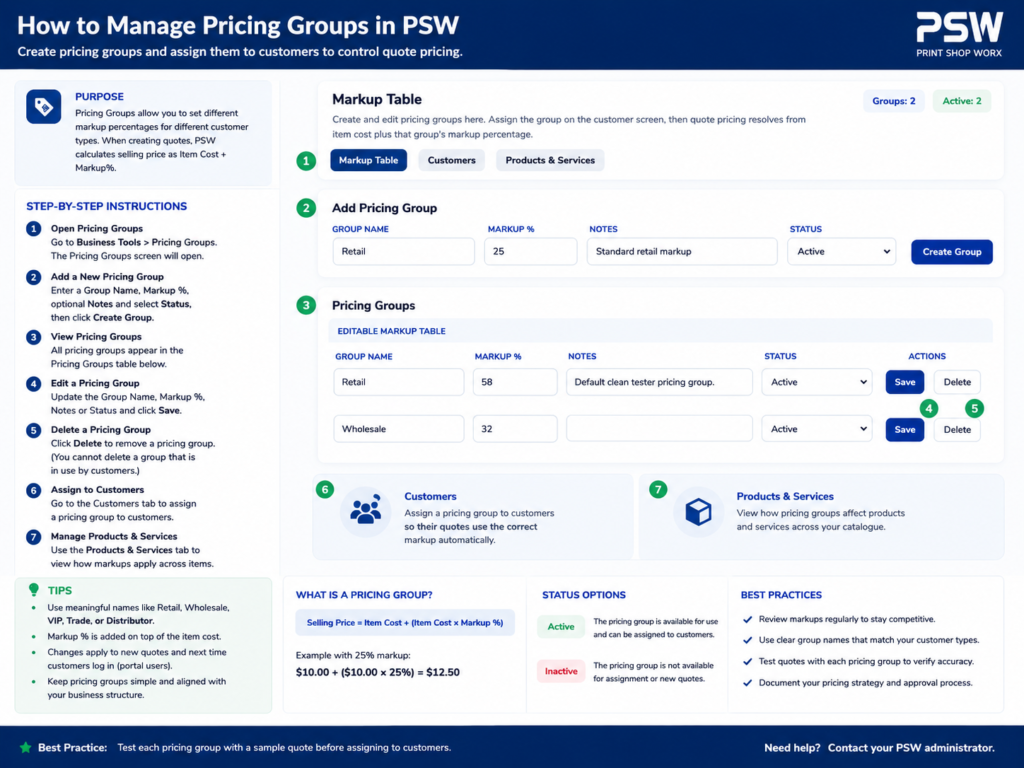
Step-by-Step Instructions
PSW Pricing Groups & Customer Pricing Guide
Overview
The Pricing Groups & Customer Pricing system allows businesses to automatically apply custom pricing structures to different customers inside Print Shop Worx.
This feature helps businesses maintain consistent pricing, simplify quoting, automate invoice pricing, and manage wholesale or trade pricing efficiently.
Pricing Groups are designed to support businesses that offer:
- Retail pricing
- Wholesale pricing
- VIP pricing
- Trade pricing
- Staff pricing
- Contract pricing
- Custom negotiated pricing
The Pricing Groups module is commonly used by:
- Sales staff
- Administration teams
- Account managers
- Business owners
- Customer service staff
Main Functions
The Pricing Groups system allows users to:
- Create pricing groups
- Assign pricing groups to customers
- Apply automatic pricing adjustments
- Manage wholesale pricing
- Create customer-specific pricing
- Simplify quoting workflows
- Maintain pricing consistency
- Control profit margins
- Support volume pricing
What Are Pricing Groups?
Purpose
Pricing Groups are pricing rules assigned to customers that automatically adjust product and service pricing throughout the system.
Instead of manually changing prices for every customer, businesses can create pricing groups that apply automatically.
This saves time and reduces pricing errors.
How Pricing Groups Work
Example Workflow
A standard product may have:
- Base Cost Price: $20.00
- Standard Sell Price: $40.00
Different pricing groups may apply different pricing rules:
Pricing Group
Adjustment
Retail
Standard pricing
Wholesale
-15%
VIP
-10%
Staff
-25%
Trade
-20%
When a customer is assigned to a pricing group, pricing automatically updates during:
- Quotes
- Invoices
- Orders
- Production jobs
Why Pricing Groups Are Important
Pricing Groups help businesses:
- Automate pricing
- Maintain consistency
- Reduce pricing mistakes
- Improve quoting speed
- Protect profit margins
- Support multiple customer types
- Simplify large customer management
Pricing Group Dashboard
Purpose
The Pricing Group dashboard provides an overview of all pricing structures configured in the system.
Users can:
- View pricing groups
- Create new groups
- Edit pricing rules
- Assign customers
- Monitor pricing adjustments
Pricing Group Fields
Pricing Group Name
Stores the name of the pricing structure.
Examples include:
- Retail
- Wholesale
- VIP
- Staff
- Trade
- Contractor
Pricing Adjustment
Controls how pricing is adjusted for customers assigned to the group.
Adjustments may include:
- Percentage discounts
- Percentage markups
- Fixed pricing
- Volume pricing
Active Status
Controls whether the pricing group is currently active.
Inactive pricing groups remain stored for historical records but are generally unavailable for new assignments.
Customer Pricing Assignment
Purpose
Customers can be assigned to a pricing group within their customer profile.
Once assigned, pricing adjustments automatically apply throughout the system.
This improves:
- Workflow efficiency
- Pricing accuracy
- Customer consistency
Standard Customer Pricing Workflow
Pricing Assignment Process
- Open Customer Profile
- Select Pricing Group
- Save customer record
- Pricing automatically applies to future quotes and invoices
Product Pricing Structure
Purpose
Products may contain:
- Cost price
- Base sell price
- Pricing group adjustments
This structure allows the system to calculate pricing automatically.
Cost Price vs Sell Price
Cost Price
The internal business cost for the item or service.
Examples include:
- Garment cost
- Decoration cost
- Freight cost
- Supplier pricing
Cost pricing is generally hidden from customers.
Sell Price
The customer-facing selling price.
Sell pricing may change based on:
- Pricing groups
- Discounts
- Promotions
- Volume orders
Automatic Pricing Calculations
Purpose
Pricing groups automatically calculate customer pricing during:
- Quotes
- Invoices
- Orders
- Shopping cart workflows
This reduces manual calculations and pricing mistakes.
Wholesale Pricing
Purpose
Wholesale pricing supports businesses selling to:
- Resellers
- Trade customers
- Contractors
- Corporate clients
Wholesale customers may receive discounted pricing based on negotiated agreements.
VIP & Contract Pricing
Purpose
VIP or contract pricing allows businesses to offer preferred pricing to selected customers.
Examples include:
- High-volume customers
- Long-term clients
- Government contracts
- Corporate accounts
Staff Pricing
Purpose
Staff pricing groups allow businesses to offer discounted pricing to employees.
Examples include:
- Uniform purchases
- Promotional products
- Internal branding
Volume Pricing
Purpose
Volume pricing allows pricing adjustments based on order quantity.
Examples include:
Quantity
Discount
1-10
Standard pricing
11-50
10% discount
51-100
15% discount
Volume pricing helps businesses encourage larger orders.
Pricing Consistency
Purpose
The Pricing Groups system helps maintain consistent pricing across:
- Sales staff
- Quotes
- Invoices
- Production workflows
This reduces pricing disputes and customer confusion.
Best Practices
Always Assign Pricing Groups
Assign pricing groups during customer setup to improve:
- Workflow speed
- Pricing accuracy
- Customer consistency
Protect Cost Pricing
Restrict access to cost pricing where appropriate.
This helps protect:
- Profit margins
- Supplier pricing
- Internal business information
Review Pricing Regularly
Regularly review pricing groups to ensure:
- Profitability
- Competitive pricing
- Updated supplier costs
Use Clear Pricing Group Names
Use simple and consistent naming conventions.
Examples:
- Retail
- Wholesale
- VIP
- Trade
This improves staff understanding and workflow efficiency.
Common Use Cases
Wholesale Customers
Automatically apply discounted pricing for trade or reseller customers.
Repeat Customers
Offer preferred pricing to long-term or high-volume customers.
Staff Purchases
Provide internal staff discounts through dedicated pricing groups.
Corporate Contracts
Apply negotiated pricing structures for large business clients.
Troubleshooting
Pricing Not Updating
Check:
- Customer pricing group assignment
- Product pricing setup
- Pricing rules configuration
- Database synchronization
Incorrect Discounts
Check:
- Pricing adjustment percentages
- Volume pricing rules
- Product pricing settings
Customer Receiving Wrong Pricing
Check:
- Assigned pricing group
- Customer profile settings
- Invoice recalculation
Pricing Group Missing
Check:
- Active status
- User permissions
- Pricing group configuration
Related Features
The Pricing Groups system works closely with:
- Customers
- Quotes
- Invoices
- Products
- Inventory
- Reporting
- Production Jobs
- Customer Portal
Summary
The Pricing Groups & Customer Pricing system is a critical pricing automation feature within Print Shop Worx.
Proper pricing management improves:
- Workflow efficiency
- Pricing consistency
- Profit protection
- Customer management
- Sales accuracy
- Quoting speed
A structured pricing system helps businesses automate customer pricing while maintaining accurate and professional financial workflows.
What to Check Before Saving
- Pricing group names are clear and easy for staff to understand.
- Markup and margin rules calculate correctly.
- Customers are assigned to the correct pricing group.
- Products and services use the expected sell pricing.
- Quotes display correct totals before sending to customers.
Best Practice
- Use pricing groups instead of manually overriding prices where possible.
- Keep cost pricing separate from sell pricing.
- Review pricing groups regularly to protect margins.
- Use clear names such as Retail, Trade, Wholesale, and VIP.
- Test pricing changes before applying them to live customer quotes.
- Document custom pricing rules for staff consistency.
Common Issues and Fixes
- Customer receiving wrong pricing: Check the assigned pricing group in the customer record.
- Quote totals look incorrect: Review markup rules, product pricing, and GST settings.
- Manual pricing overrides causing confusion: Use pricing groups consistently instead of one-off pricing edits.
- Service pricing incorrect: Confirm service pricing rules match the assigned customer pricing group.
- Margins lower than expected: Review cost prices and markup percentages.
Related Support Articles
Related support articles include: