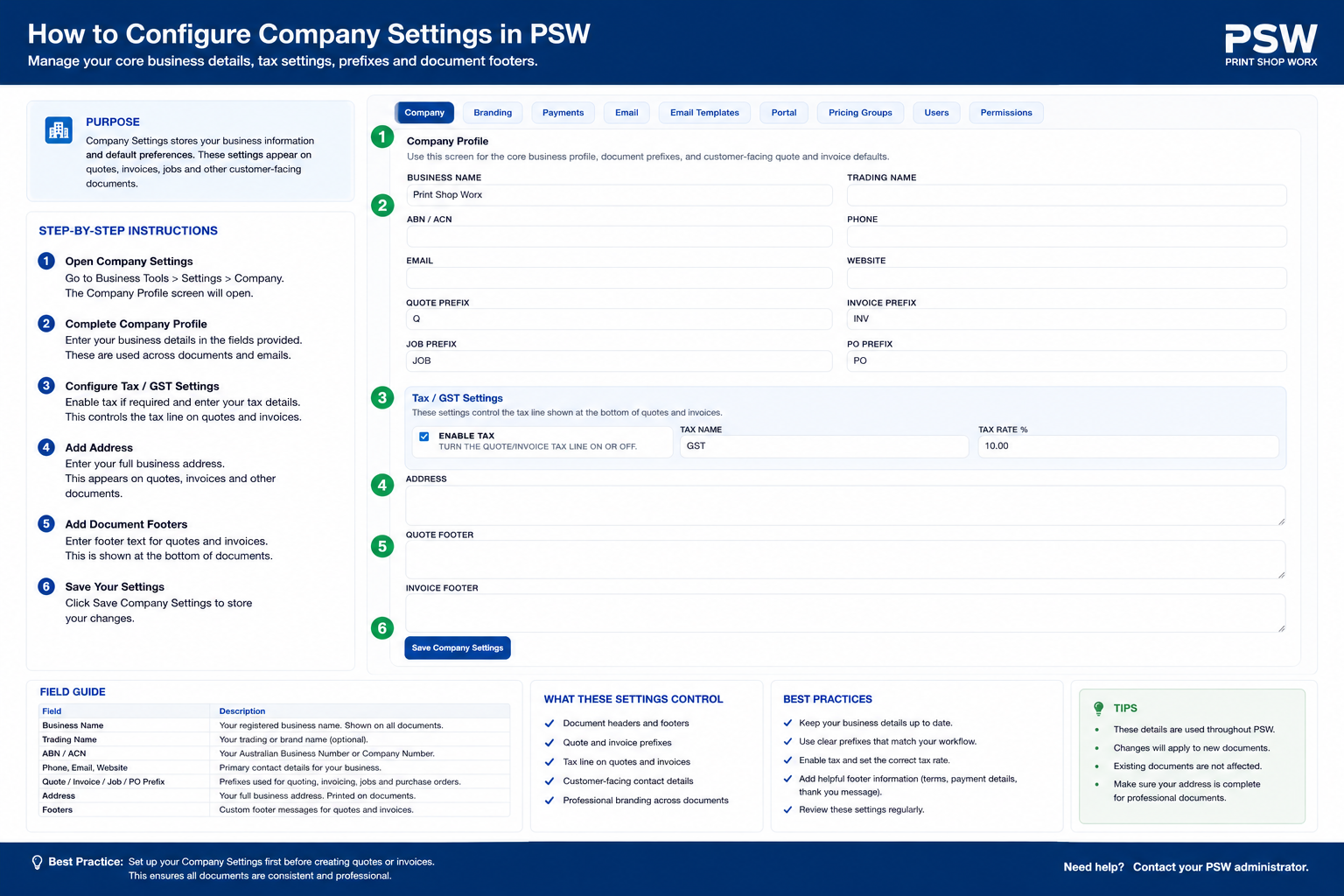
Configure your company profile, ABN/GST information, contact details, invoice details, timezone, and default business settings for Print Shop Worx.
This support article explains how to configure and maintain Company Settings inside Print Shop Worx.
Overview
The Company Settings section controls the main business information used throughout Print Shop Worx. These details appear on quotes, invoices, customer portal pages, reports, and outgoing emails.
This section should be configured before processing live customer orders.
Company Settings
Step-by-Step Instructions
Main Menu
Main Company Menu
What to Check Before Saving
Company name and ABN are correct.
GST settings are accurate.
Support email is working correctly.
Invoice details display properly.
Business address and phone number are complete.
Common Issues and Fixes
Invoice details missing: Check invoice footer and payment details.
GST totals incorrect: Review GST percentage and tax settings.
Emails not sending: Check Email Settings and SMTP configuration.
Lorem ipsum dolor sit amet, consectetur adipiscing elit, sed do eiusmod tempor incid idunt ut labore ellt dolore magna the alora aliqua alora the tolda on fouter.