Reports Documentation
Find clear, step-by-step help for every part of Print Shop Worx. Use this support hub to learn how to manage customers, quotes, invoices, production, stock, purchasing, marketing, reports, and workspace settings.
Reports system
The Reports system is commonly used by:
- Business owners
- Administration staff
- Sales managers
- Production managers
- Financial teams
- Inventory managers
Main Functions
The Reports module allows users to:
- Generate business reports
- Track sales performance
- Monitor production activity
- Review customer activity
- Analyze financial data
- Export reports
- Filter report data
- Monitor inventory
- Track profitability
- Analyze workflow performance
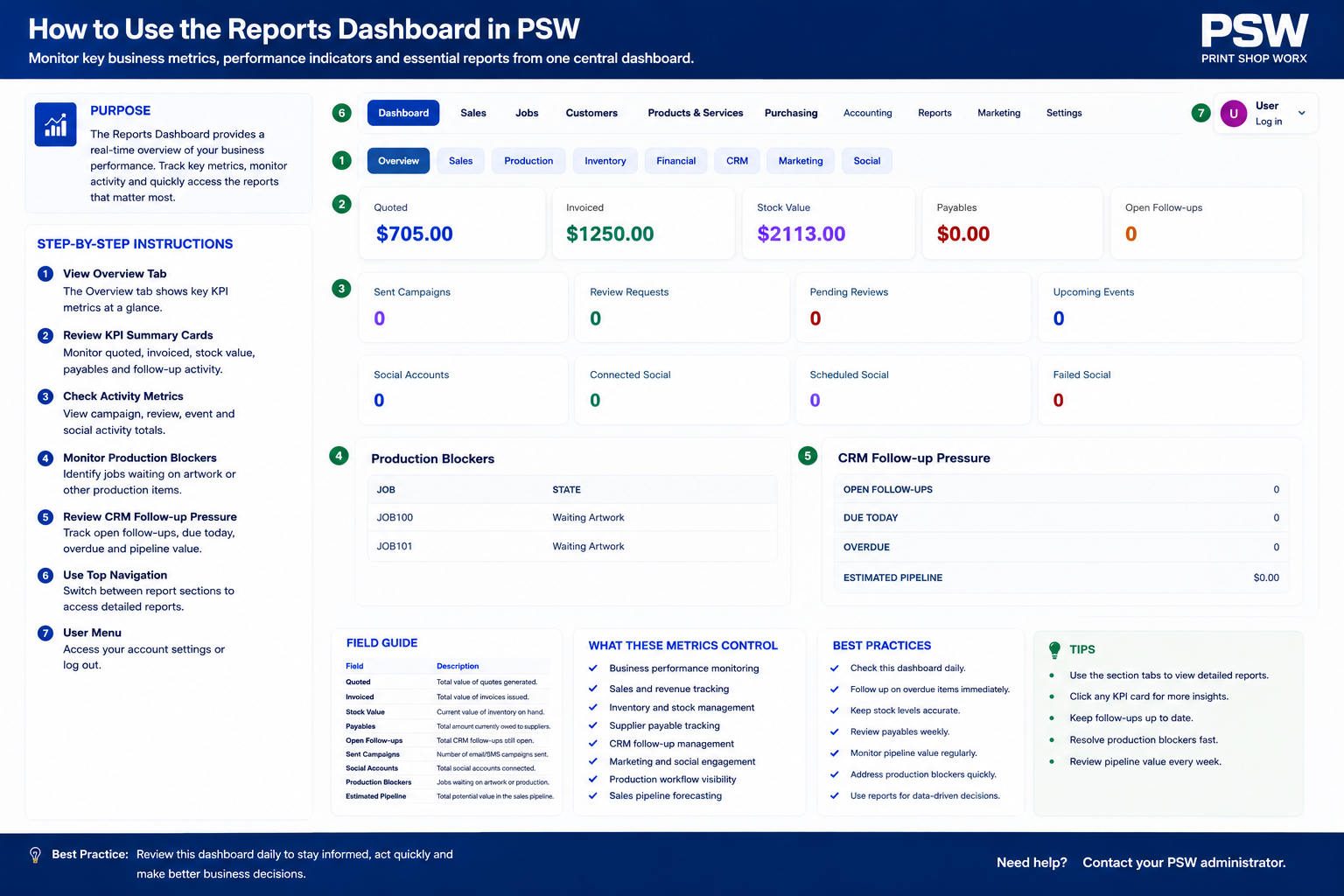
Reports Dashboard
Purpose
The Reports Dashboard provides centralized access to all available business reporting tools.
Users can quickly:
- Generate reports
- View summaries
- Filter data
- Export results
- Track business performance
- Monitor operational activity
Why Reports Are Important
Reports help businesses:
- Make informed decisions
- Monitor profitability
- Improve workflow efficiency
- Track staff productivity
- Analyze customer trends
- Monitor production performance
- Identify growth opportunities
Sales Reports
Purpose
Sales reports provide visibility into revenue and customer sales activity.
Possible sales reports include:
- Daily sales
- Weekly sales
- Monthly sales
- Annual sales
- Sales by customer
- Sales by product
- Sales by department
Revenue Reports
Purpose
Revenue reports help businesses track financial performance.
Revenue data may include:
- Gross revenue
- Net revenue
- Outstanding invoices
- Payments received
- Revenue trends
Quote Reports
Purpose
Quote reports help businesses track quotation performance.
Possible metrics include:
- Quotes created
- Quotes approved
- Quotes rejected
- Conversion rates
- Pending quotes
This helps improve sales tracking and customer follow-up.
Invoice Reports
Purpose
Invoice reporting provides visibility into customer billing and payments.
Possible reports include:
- Paid invoices
- Outstanding invoices
- Overdue invoices
- Invoice totals
- Customer balances
Payment Reports
Purpose
Payment reports help businesses monitor incoming payments and financial activity.
Possible reports include:
- Payments received
- Deposit tracking
- Outstanding balances
- Payment methods
- Customer payment history
Customer Reports
Purpose
Customer reports provide visibility into customer activity and purchasing behavior.
Possible reports include:
- Top customers
- Customer spend totals
- Repeat customers
- Customer order history
- Customer activity trends
Production Reports
Purpose
Production reports help businesses monitor manufacturing workflows and operational performance.
Possible reports include:
- Jobs completed
- Production delays
- Production volume
- Workflow efficiency
- Production status summaries
Production Department Reports
Purpose
Businesses may track production performance by department.
Examples include:
- Embroidery production
- Screen printing production
- DTF production
- Sublimation production
Inventory Reports
Purpose
Inventory reporting helps businesses monitor stock levels and inventory movement.
Possible reports include:
- Current stock levels
- Low stock alerts
- Inventory movement
- Supplier purchasing
- Product usage
Product Reports
Purpose
Product reports help businesses identify product performance and sales trends.
Possible reports include:
- Best-selling products
- Slow-moving products
- Product profitability
- Product category performance
Financial Reports
Purpose
Financial reports provide broader business financial visibility.
Possible financial reports include:
- Revenue summaries
- Tax reports
- Profit analysis
- Expense tracking
- Outstanding balances
Profitability Reports
Purpose
Profitability reports help businesses understand:
- Product margins
- Customer profitability
- Department profitability
- Job profitability
This supports better pricing and operational decisions.
Staff Performance Reports
Purpose
Staff reporting helps businesses monitor productivity and workflow performance.
Possible reports include:
- Jobs completed
- Sales performance
- Production efficiency
- Quote conversion rates
Marketing Reports
Purpose
Marketing reports track customer engagement and campaign performance.
Possible reports include:
- Email campaign performance
- Social media engagement
- Lead generation
- Campaign conversions
Artwork Approval Reports
Purpose
Artwork reports help businesses monitor approval workflows.
Possible reports include:
- Pending approvals
- Approval turnaround times
- Revision requests
- Approval completion rates
Purchase Order Reports
Purpose
Purchase Order reports help businesses track supplier purchasing activity.
Possible reports include:
- Supplier spending
- Outstanding purchase orders
- Inventory purchasing trends
- Backorders
Report Filters
Purpose
Report filters allow users to refine report data.
Common filters include:
- Date range
- Customer
- Product
- Staff member
- Department
- Production type
- Status
Exporting Reports
Purpose
Reports may be exported for:
- Accounting
- Business analysis
- Meetings
- External reporting
- Data backups
Possible export formats include:
- CSV
- Excel
- Printable reports
Scheduled Reports
Purpose
Scheduled reporting allows businesses to automatically generate and deliver reports.
Examples include:
- Daily sales summaries
- Weekly production reports
- Monthly revenue reports
Dashboard Reporting Widgets
Purpose
Dashboard widgets provide quick visual reporting summaries.
Possible widgets include:
- Sales totals
- Revenue charts
- Production summaries
- Invoice statistics
- Customer activity
Real-Time Reporting
Purpose
Some reports may update automatically in real time.
This helps businesses monitor:
- Sales activity
- Production progress
- Payment updates
- Workflow changes
Best Practices
Review Reports Regularly
Regular reporting reviews help identify:
- Workflow bottlenecks
- Sales opportunities
- Financial issues
- Inventory shortages
Monitor Profitability
Regular profitability analysis helps protect:
- Margins
- Pricing accuracy
- Financial performance
Use Filters Effectively
Filtering reports improves:
- Data visibility
- Reporting accuracy
- Decision-making
Export Reports For Backup
Regularly exporting reports helps maintain:
- Historical records
- Financial documentation
- Operational tracking
Common Use Cases
Sales Performance Analysis
Monitor revenue and quote conversions.
Production Monitoring
Track workflow efficiency and production performance.
Inventory Management
Monitor stock levels and supplier purchasing activity.
Financial Reporting
Review payments, invoices, and profitability.
Troubleshooting
Report Not Loading
Check:
- Internet connection
- Database status
- User permissions
- Filter settings
Incorrect Report Totals
Check:
- Invoice status
- Payment records
- Tax settings
- Report configuration
Missing Data
Check:
- Date filters
- User permissions
- Data synchronization
Export Not Working
Check:
- File permissions
- Browser settings
- Export format compatibility
Related Features
The Reports module works closely with:
- Customers
- Quotes
- Invoices
- Payments
- Production Workflow
- Inventory
- Marketing
- Purchase Orders
- Sales Dashboard
Summary
The Reports module is a critical business intelligence and operational management feature within Print Shop Worx.
Proper reporting improves:
- Financial visibility
- Workflow management
- Production efficiency
- Customer analysis
- Inventory control
- Business decision-making
A well-structured reporting system helps businesses monitor performance, improve operations, and support long-term growth through accurate business insights.
All Support Article Links
Use this list as your built-in link map. Update or remove links if your page slugs are different.
- Welcome to Print Shop Worx
- First Login & Password Setup
- Customers
- Customer Portal
- Quotes
- Invoices
- Sales Workflow & CRM
- Sales Workspace
- Pricing Groups & Customer Pricing
- Product Setup
- Services
- Production Workflow
- Production Queue
- Stock Allocation & Ordering
- Purchase Orders
- Suppliers
- Scan Console
- Reports
- Marketing Campaigns
- Social Scheduler
- Workspace Setup
- Users & Permissions
Need help with Print Shop Worx?
Book a demo or contact support if you need help setting up your support pages or using Print Shop Worx.